cse15l-lab-reports
Lab Report 5 - Debugging Scenario
Part 1 - Student Debugging Post
1) Environment: Operating system = Windows 11, Editor = Visual Studio Code, Terminal = Git Bash in VS Code
2) Symptom:
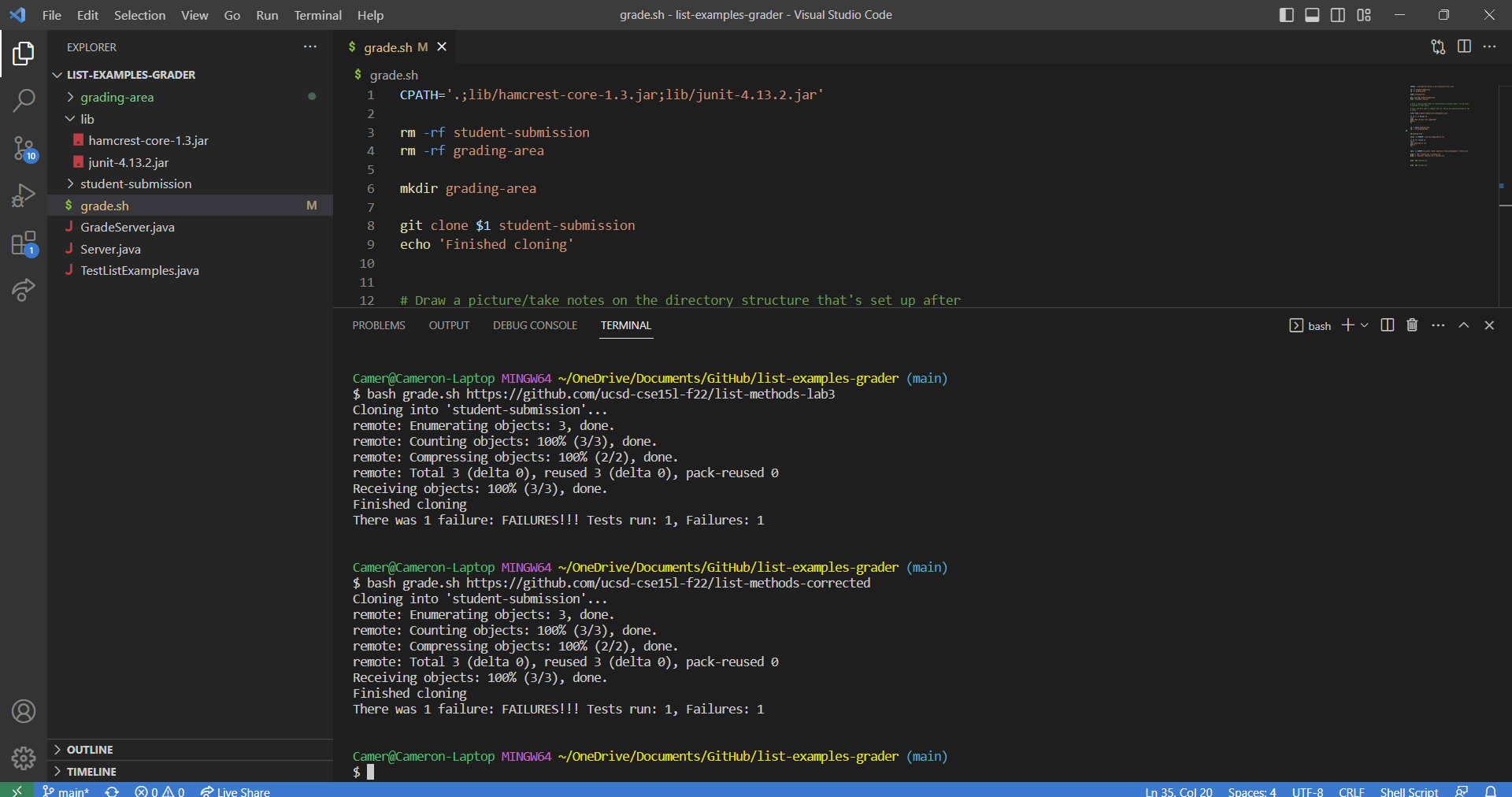
Camer@Cameron-Laptop MINGW64 ~/OneDrive/Documents/GitHub/list-examples-grader (main)
$ bash grade.sh https://github.com/ucsd-cse15l-f22/list-methods-corrected
Cloning into 'student-submission'...
remote: Enumerating objects: 3, done.
remote: Counting objects: 100% (3/3), done.
remote: Compressing objects: 100% (2/2), done.
remote: Total 3 (delta 0), reused 3 (delta 0), pack-reused 0
Receiving objects: 100% (3/3), done.
Finished cloning
There was 1 failure: FAILURES!!! Tests run: 1, Failures: 1
Expected: All tests should pass on the https://github.com/ucsd-cse15l-f22/list-methods-corrected student submission because it is the correct implementation of ListExamples. The tests should fail the https://github.com/ucsd-cse15l-f22/list-methods-lab3 student submission because it is an incorrect implementation of ListExamples.
Actual: Both https://github.com/ucsd-cse15l-f22/list-methods-corrected and https://github.com/ucsd-cse15l-f22/list-methods-lab3 student submissions fail the tests for ListExamples.
3) Failure-Inducing Input and Context:
Failure-inducing input: https://github.com/ucsd-cse15l-f22/list-methods-corrected
The commands used: bash grade.sh https://github.com/ucsd-cse15l-f22/list-methods-corrected and bash grade.sh https://github.com/ucsd-cse15l-f22/list-methods-lab3
Working Directory: list-examples-grader
Last commands ran: None, this is a new terminal
TestListExamples.java is unchanged compared to given file.
grade.sh Script:
 CPATH='.;lib/hamcrest-core-1.3.jar;lib/junit-4.13.2.jar'

rm -rf student-submission
rm -rf grading-area

mkdir grading-area

git clone $1 student-submission
echo 'Finished cloning'


# Draw a picture/take notes on the directory structure that's set up after
# getting to this point

# Then, add here code to compile and run, and do any post-processing of the
# tests

file=`find student-submission/ListExamples.java`

if [[ (! -f $file) ]]
then
echo "Not correct file submitted"
exit 1
fi


cp -r $file grading-area
cp -r lib grading-area


cd grading-area

javac -cp $CPATH *.java 2> CompileError.txt

if [[ ($? -ne 0) ]]
then
cat CompileError.txt
exit 1
fi


java -cp $CPATH org.junit.runner.JUnitCore TestListExamples > results.txt

grep -i "OK" results.txt > success.txt
grep -i "Failure" results.txt > failure.txt


echo `cat failure.txt`


echo `cat success.txt`
TA Response
First, run bash grade.sh https://github.com/ucsd-cse15l-f22/list-methods-corrected. Then, show what is contained in result.txt with cat grading-area/result.txt. Finally, send a screenshot of the terminal output or a copy of the output.
Student Reply
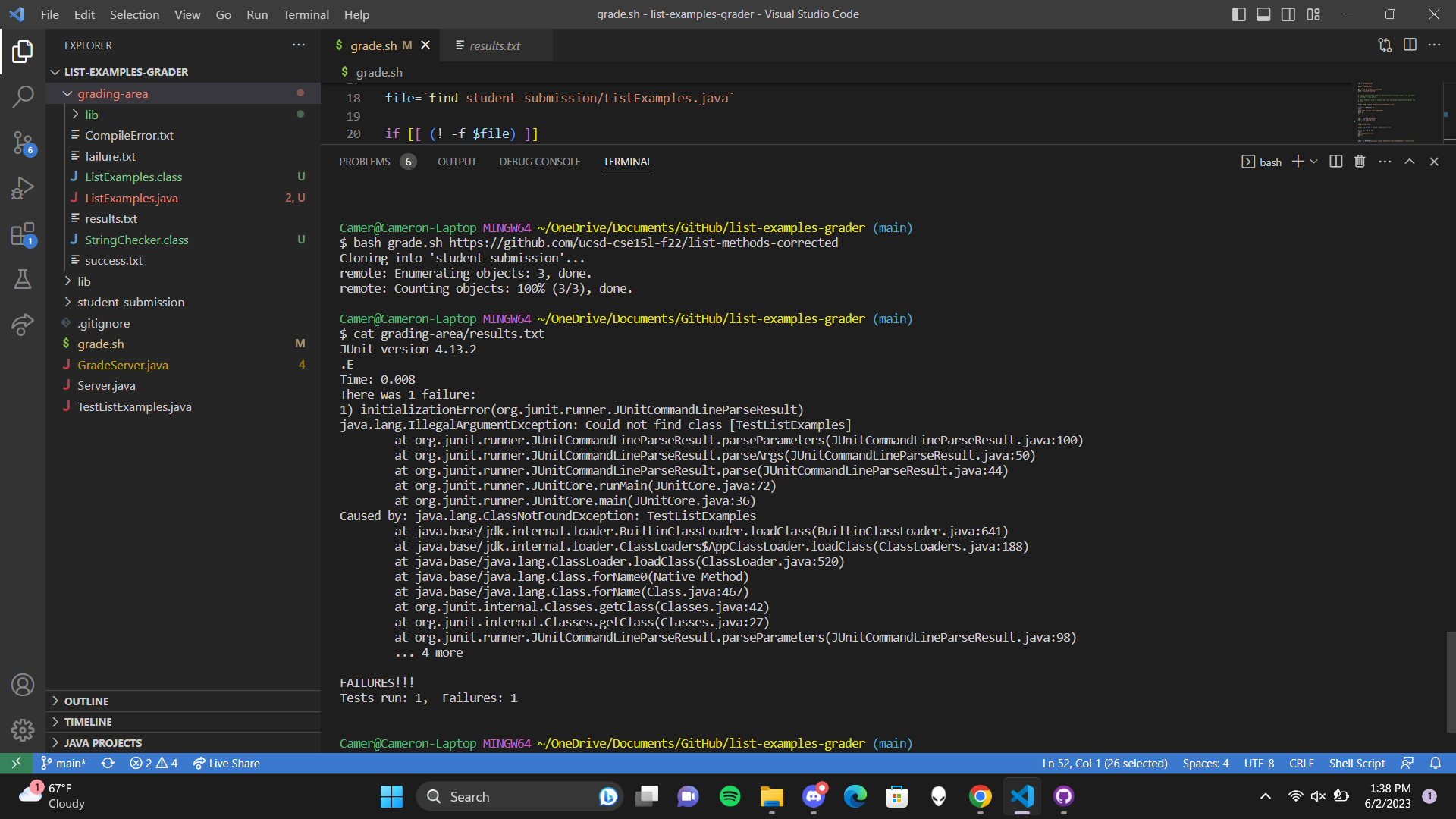
Camer@Cameron-Laptop MINGW64 ~/OneDrive/Documents/GitHub/list-examples-grader (main)
$ bash grade.sh https://github.com/ucsd-cse15l-f22/list-methods-corrected
Cloning into 'student-submission'...
remote: Enumerating objects: 3, done.
remote: Counting objects: 100% (3/3), done.

Camer@Cameron-Laptop MINGW64 ~/OneDrive/Documents/GitHub/list-examples-grader (main)
$ cat grading-area/results.txt
JUnit version 4.13.2
.E
Time: 0.008
There was 1 failure:
1) initializationError(org.junit.runner.JUnitCommandLineParseResult)
java.lang.IllegalArgumentException: Could not find class [TestListExamples]
        at org.junit.runner.JUnitCommandLineParseResult.parseParameters(JUnitCommandLineParseResult.java:100)
        at org.junit.runner.JUnitCommandLineParseResult.parseArgs(JUnitCommandLineParseResult.java:50)
        at org.junit.runner.JUnitCommandLineParseResult.parse(JUnitCommandLineParseResult.java:44)
        at org.junit.runner.JUnitCore.runMain(JUnitCore.java:72)
        at org.junit.runner.JUnitCore.main(JUnitCore.java:36)
Caused by: java.lang.ClassNotFoundException: TestListExamples
        at java.base/jdk.internal.loader.BuiltinClassLoader.loadClass(BuiltinClassLoader.java:641)
        at java.base/jdk.internal.loader.ClassLoaders$AppClassLoader.loadClass(ClassLoaders.java:188)
        at java.base/java.lang.ClassLoader.loadClass(ClassLoader.java:520)
        at java.base/java.lang.Class.forName0(Native Method)
        at java.base/java.lang.Class.forName(Class.java:467)
        at org.junit.internal.Classes.getClass(Classes.java:42)
        at org.junit.internal.Classes.getClass(Classes.java:27)
        at org.junit.runner.JUnitCommandLineParseResult.parseParameters(JUnitCommandLineParseResult.java:98)
        ... 4 more

FAILURES!!!
Tests run: 1,  Failures: 1
TA Response - Solution
It appears that the file TestListExamples.java is not within the grading-area directory. This means there are not any tests being ran on the student submission of ListExamples.java. The bug is that TestListExamples.java does not exist in the grading-area directory where the student submission is contained, so there is not a file for testing the submission.
Solution: In your grade.sh script, you need to copy TestListExamples.java into grading-area as well which should fix the bug.
Student Reply - Bug Fixed
Thank you! It is working as expected now.
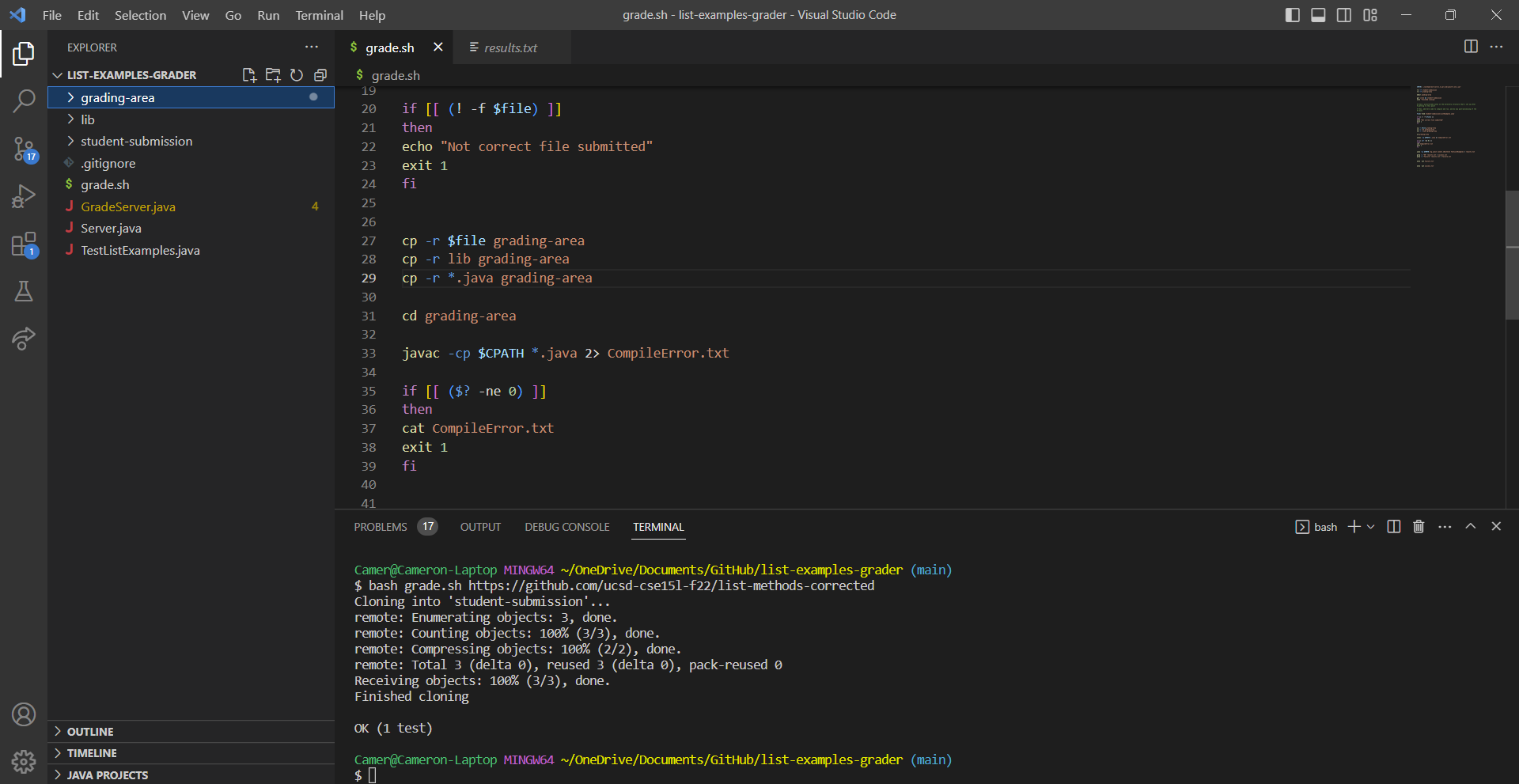
The Setup
Directories Needed: list-examples-grader, lib
Files/Directories Contained in list-examples-grader: lib, grade.sh, GradeServer.java, TestListExamples.java, Server.java, .gitignore
Files Needed and Contained in lib: junit-4.13.2.jar, hamcrest-core-1.3.jar
Contents of Files Before Bug
grade.sh:
CPATH='.;lib/hamcrest-core-1.3.jar;lib/junit-4.13.2.jar'

rm -rf student-submission
rm -rf grading-area

mkdir grading-area

git clone $1 student-submission
echo 'Finished cloning'


# Draw a picture/take notes on the directory structure that's set up after
# getting to this point

# Then, add here code to compile and run, and do any post-processing of the
# tests

file=`find student-submission/ListExamples.java`

if [[ (! -f $file) ]]
then
echo "Not correct file submitted"
exit 1
fi


cp -r $file grading-area
cp -r lib grading-area

cd grading-area

javac -cp $CPATH *.java 2> CompileError.txt

if [[ ($? -ne 0) ]]
then
cat CompileError.txt
exit 1
fi


java -cp $CPATH org.junit.runner.JUnitCore TestListExamples > results.txt

grep -i "OK" results.txt > success.txt
grep -i "Failure" results.txt > failure.txt


echo `cat failure.txt`


echo `cat success.txt`
TestListExamples.java:
import static org.junit.Assert.*;
import org.junit.*;
import java.util.Arrays;
import java.util.List;

class IsMoon implements StringChecker {
  public boolean checkString(String s) {
    return s.equalsIgnoreCase("moon");
  }
}

public class TestListExamples {
  @Test(timeout = 500)
  public void testMergeRightEnd() {
    List<String> left = Arrays.asList("a", "b", "c");
    List<String> right = Arrays.asList("a", "d");
    List<String> merged = ListExamples.merge(left, right);
    List<String> expected = Arrays.asList("a", "a", "b", "c", "d");
    assertEquals(expected, merged);
  }
}
GradeServer.java:
import java.io.BufferedReader;
import java.io.IOException;
import java.io.InputStream;
import java.io.InputStreamReader;
import java.net.URI;
import java.net.URISyntaxException;
import java.util.Arrays;
import java.util.stream.Stream;

class ExecHelpers {

  /**
    Takes an input stream, reads the full stream, and returns the result as a
    string.

    In Java 9 and later, new String(out.readAllBytes()) would be a better
    option, but using Java 8 for compatibility with ieng6.
  */
  static String streamToString(InputStream out) throws IOException {
    String result = "";
    while(true) {
      int c = out.read();
      if(c == -1) { break; }
      result += (char)c;
    }
    return result;
  }

  /**
    Takes a command, represented as an array of strings as it would by typed at
    the command line, runs it, and returns its combined stdout and stderr as a
    string.
  */
  static String exec(String[] cmd) throws IOException {
    Process p = new ProcessBuilder()
                    .command(Arrays.asList(cmd))
                    .redirectErrorStream(true)
                    .start();
    InputStream outputOfBash = p.getInputStream();
    return String.format("%s\n", streamToString(outputOfBash));
  }

}

class Handler implements URLHandler {
    public String handleRequest(URI url) throws IOException {
       if (url.getPath().equals("/grade")) {
           String[] parameters = url.getQuery().split("=");
           if (parameters[0].equals("repo")) {
               String[] cmd = {"bash", "grade.sh", parameters[1]};
               String result = ExecHelpers.exec(cmd);
               return result;
           }
           else {
               return "Couldn't find query parameter repo";
           }
       }
       else {
           return "Don't know how to handle that path!";
       }
    }
}

class GradeServer {
    public static void main(String[] args) throws IOException {
        if(args.length == 0){
            System.out.println("Missing port number! Try any number between 1024 to 49151");
            return;
        }

        int port = Integer.parseInt(args[0]);

        Server.start(port, new Handler());
    }
}

class ExecExamples {
  public static void main(String[] args) throws IOException {
    String[] cmd1 = {"ls", "lib"};
    System.out.println(ExecHelpers.exec(cmd1));

    String[] cmd2 = {"pwd"};
    System.out.println(ExecHelpers.exec(cmd2));

    String[] cmd3 = {"touch", "a-new-file.txt"};
    System.out.println(ExecHelpers.exec(cmd3));
  }
}
Server.java:
// A simple web server using Java's built-in HttpServer

// Examples from https://dzone.com/articles/simple-http-server-in-java were useful references

import java.io.IOException;
import java.io.OutputStream;
import java.net.InetSocketAddress;
import java.net.URI;

import com.sun.net.httpserver.HttpExchange;
import com.sun.net.httpserver.HttpHandler;
import com.sun.net.httpserver.HttpServer;

interface URLHandler {
    String handleRequest(URI url) throws IOException;
}

class ServerHttpHandler implements HttpHandler {
    URLHandler handler;
    ServerHttpHandler(URLHandler handler) {
      this.handler = handler;
    }
    public void handle(final HttpExchange exchange) throws IOException {
        // form return body after being handled by program
        try {
            String ret = handler.handleRequest(exchange.getRequestURI());
            // form the return string and write it on the browser
            exchange.sendResponseHeaders(200, ret.getBytes().length);
            OutputStream os = exchange.getResponseBody();
            os.write(ret.getBytes());
            os.close();
        } catch(Exception e) {
            String response = e.toString();
            exchange.sendResponseHeaders(500, response.getBytes().length);
            OutputStream os = exchange.getResponseBody();
            os.write(response.getBytes());
            os.close();
        }
    }
}

public class Server {
    public static void start(int port, URLHandler handler) throws IOException {
        HttpServer server = HttpServer.create(new InetSocketAddress(port), 0);

        //create request entrypoint
        server.createContext("/", new ServerHttpHandler(handler));

        //start the server
        server.start();
        System.out.println("Server Started! Visit http://localhost:" + port + " to visit.");
    }
}
.gitignore:
*.class
*.txt
grading-area
Must Download JUNIT to get junit-4.13.2.jar and hamcrest-core-1.3.jar files
Command Line to Trigger Bug
bash grade.sh https://github.com/ucsd-cse15l-f22/list-methods-corrected
Bug Fix
To fix the bug, grade.sh needs to be edited. It needs an additional line of code to copy ListExamples.java into grading-area. The line of code to add is cp -r *.java grading-area and it needs to be placed with the other lines of code that copy files into grading area.
The lines of code that the fix needs to be placed with:
cp -r $file grading-area
cp -r lib grading-area
grade.sh without the bug should look something like this:
CPATH='.;lib/hamcrest-core-1.3.jar;lib/junit-4.13.2.jar'

rm -rf student-submission
rm -rf grading-area

mkdir grading-area

git clone $1 student-submission
echo 'Finished cloning'


# Draw a picture/take notes on the directory structure that's set up after
# getting to this point

# Then, add here code to compile and run, and do any post-processing of the
# tests

file=`find student-submission/ListExamples.java`

if [[ (! -f $file) ]]
then
echo "Not correct file submitted"
exit 1
fi


cp -r $file grading-area
cp -r lib grading-area
cp -r *.java grading-area

cd grading-area

javac -cp $CPATH *.java 2> CompileError.txt

if [[ ($? -ne 0) ]]
then
cat CompileError.txt
exit 1
fi


java -cp $CPATH org.junit.runner.JUnitCore TestListExamples > results.txt

grep -i "OK" results.txt > success.txt
grep -i "Failure" results.txt > failure.txt


echo `cat failure.txt`


echo `cat success.txt`
Part 2 - Reflection
I think the most important thing I learned from lab in the second half of the quarter was how to remotely access and edit files along with using github from the terminal. Knowing git commands makes it more convenient to add and send changes to github repositories instead of having to open GitHub Desktop each time. For editing files remotely, I forsee myself using vim very often instead of downloading files, opening them in VS Code, and then sending them back for future personal projects I plan to do. Also, I plan to try to learn many of the vim shortcuts as I think that would be something cool to know and use often.